Posts Tagged ‘online video’


By: stu | Posted: Tuesday, July 5th, 2011
Video on your website
Makes no difference what product or service you offer; sports fishing, video production, cheese making, firearms, auto service, furniture selling, real estate. You are dealing with new advertising media. After your small business has gone through all of the How-To’s you can find to engage in the new social media marketing craze, just to keep up with the competition, when all is said and done, your most powerful tool is still simply telling what you know directly to your market.
Marketers, scriptwriters, social media gurus and ad agents might know how to engage people, but they don’t know your product and service like you do.

Go Directly to Your Market

Cut through all of the media hype by talking directly to your market on your web video player.­­­­­­­­­­ ­­­ You, on video, for 90 seconds can do more to bring business through your front doors than hundreds of hits on a Face Book page or a thousand short tweets on Twitter. And, a compelling and personal video from you to your market has the added frosting on the cake of actually creating Face Book and Twitter hits. Done right, it can happen naturally and automatically.
“Get ‘em through your door…”
Get ‘em through your door by shooting a compelling web video. Place it on your custom web site, email links out, even utilize YouTube as a secondary outlet and of course track all of the responses with built in analytics.
If you are finding it difficult to locate a media management application that does all of the above, contact the Customer Support Pros at EZWebPlayer.com. They’ll take your video and help you turn it into a social media magnet. They’ll even work with your ad agency to do whatever it takes to get your video up and running on The Web.
Have a video that you want to share now on your website video player? Click on the “Sign Up Now“, or “Try it Freebuttons.
Stuart Marks
Executive Creative Director
Business Video Applications

By: stu | Posted: Tuesday, June 14th, 2011
When you are managing a video on EZWebplayer’s Video Player, you have two choices for hosting; you can host your video elsewhere and simply enter its address into the URL field, or you can upload the video to the EZWebPlayer servers.
There are many advantages to hosting your video on EZWebPlayer’s Amazon Cloud Front servers, but one of them is the simplicity with which you can manage the thumbnail image.
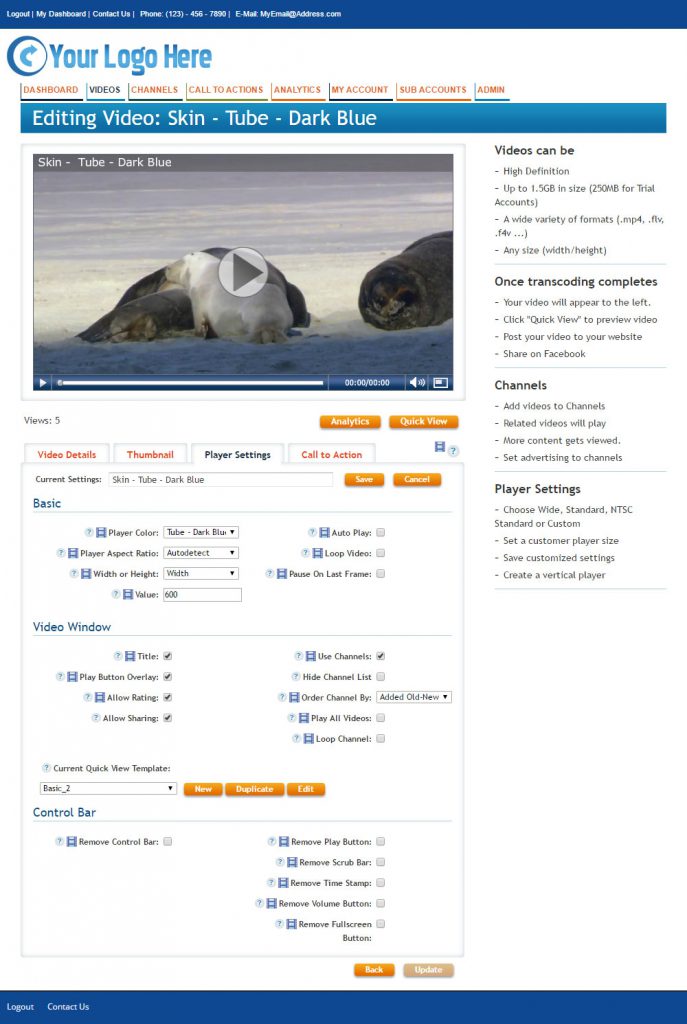
After uploading a video, you will see this setup window;
Thumb Settings for video on your web site


This is where you have an opportunity to manage the thumb image. Doing nothing will allow the default settings to engage, thereby selecting a frame from the video which shows up everywhere the video is paused and ready to play from the beginning. If you do not like the default image, there are other choices.

Thumb choices for video on your web site


The Player chooses four more images that you can choose from, or you can choose to upload your own custom image, which is a powerful and unique tool for sales and promotion.


Have a video that you want to share now? Click on the “Sign Up Now“, or “Try it Freebuttons.

Stuart Marks
Executive Creative Director
Business Video Applications

By: clintpollock | Posted: Thursday, June 9th, 2011

Advertising is not a clear cut science. At best, it is a balance between gambling and knowing recent history of the target market. If one wants any given advertising campaign to be successful, one needs to make the campaign lean as far away from gambling, and as far towards history based design as possible.

This is why a track record of how viewers are responding to your current videos, or Analytics, is so important.

Analytics is a permanent record of what the real world thinks of your efforts to share information with them. It tells you what worked, what didn’t, and what needs tweaking to make it work better in the future.

Listen to one producer/advertiser’s remarks captured remotely, on analytics.


The ease of getting the information is another element of concern. Too many times analyzable information is only delivered in mass dumps where the data is lost in the delivery; like not seeing the trees for the forest. Analytical data is too important to need a specialist for interpretation. We’re not talking medical x-rays, here. We’re just talking Video.

So, the data needs to be in two levels; 1) The At-A-Glance chart, and 2) The In-Depth level.

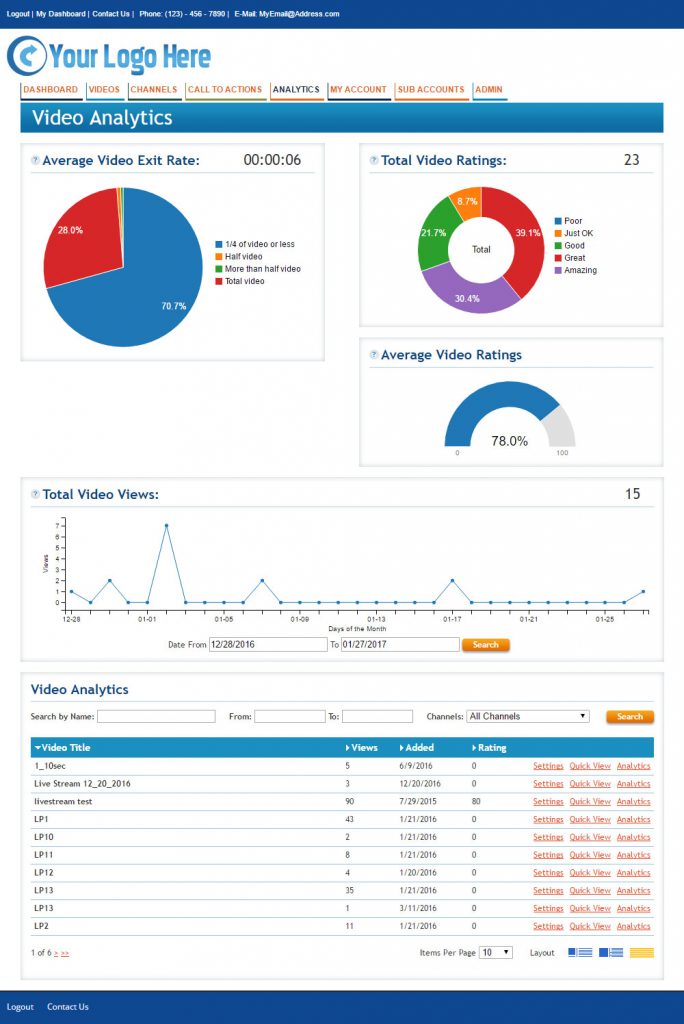
Video AnalyticsHere is a good example of the At-A-Glance from the dashboard of my EZWebPlayer Account.


Here’s a close up of a roll-over function that delivers absolute, non-charted values in addition to the graphic pie chart.


Video Analytics


The deeper, In-Depth data can be seen below. Here, I can see the specific types of views my videos received from real people. Some watched all of the video and some only watched part of it. The system records the viewer activity in ten-second increments so I can tell when the viewing stopped. This allows me to determine which part of the video people are finding too boring, or otherwise uninteresting to them specifically. I can then change the video at that point.

These Reports were all harvested by merely clicking on the Reports tab, and then on the title of a video. Two clicks and I have valuable, analytical data at my finger tips.


Creating advertising campaigns that deliver real results comes from better planning. And better planning needs analytical information.

Have a video that you want to share now? Click on the “Sign Up Now“, or “Try it Freebuttons.

Stuart Marks
Executive Creative Director
Business Video Applications

For some Business Video How To’s, check these links;


By: stu | Posted: Tuesday, June 7th, 2011
Video on your web siteIn marketing, the most important tools are not humor, a web site, TV commercials, or nationalizing your brand; though, all of these are effective and certainly there is a reason that 3M, Coca-Cola and Nike all use these. The absolutely most important tool is tracking.
If you don’t know where you’ve been, you cannot plan ahead with any accuracy. Agencies that handle million dollar accounts are strongly encouraged to “Get it right” more often than not by the results of return business from those million dollar clients. And, the biggest and most powerful tool that the big agencies like Leo Burnet and Aegis use is testing and tracking.
So, if you want to play The Game for your own products and services, and market successfully like the big boys, you must know what makes big differences in your efforts: what delivers and what doesn’t. And, video delivers.
To prove it to yourself, make one change and watch the results.
Here’s how:
1)      Establish a base line. Use site hits, or a well established dollar value somewhere before your bottom line.
2)      Add video to your web site, or include a link to your powerful web video in your regular newsletter.
3)      Run this for a predetermined period; 30 days minimum.
4)      Check your stats the day after your predetermined period ends.
Knowing this type of information helps you make decisions with a certain amount of credibility and reliability as to the outcome. Why is this important? So that you choose the right tools at the right time in your marketing cycles. If you only have $1,500 left in your 90-day advertising cycle, and your radio rep comes a’ knockin’, you want to have an answer to those at the head of the big table as to why you are dropping radio for a few months while you run a video that is going to cost you $1,000 to get up and running (your marketing lead is begging for a new HD web cam to record your next group of customer testimonials and they can cost up to $1k for a really good one with good audio pickup).
After you get that powerful testimonial video up and running, you can always return to radio. Now you have radio, AND a powerful web video bringing in new business. All due to your savvy testing and tracking. The next time you are charged with doing something to increase sales, more folks sitting in the big padded chairs will be listening.
Have a video that you want to share now? Click on the “Sign Up Now“, or “Try it Freebuttons.
Stuart Marks
Executive Creative Director
Business Video Applications


By: rbouchez | Posted: Tuesday, January 4th, 2011

Whether your website is marketing the latest gadget to hit the industry or just expressing opinions in a video blog series, adding video to your website is the best way to get your viewers to stay longer on your site.  When adding video to your website you’ll want to ensure the video file is encoded properly.  A couple things to keep in mind when exporting your HD video to a web video player are to keep the video ratio consistent and achieve an acceptable balance between bitrate for both video and audio data streams and the overall size of the video file.  If the frame width and height values are not keep consistent the video might result in a distorted picture, black bars on the top or bottom and could even affect the frames per second of the video causing issues during playback.  The video hosting site will have to stream the compressed video file and then decompress the file during playback, so a large file might be difficult for some users who have slower connections and systems.  I will be using Adobe’s CS5 to demonstrate some example render setting to use when exporting your HD video to a streaming file for the web.

Video Frame Size

Video Bitrate

Audio Bitrate

1minute File Size

1280×720

VBR 2 pass -

Target 3.5M, Max 5MB

160kbps

26.1MB

1280×720

VBR 2 pass -Target Target 2.5M, Max 4MB

112kbps

18.6MB

1024×576

CBR -

1MB

96kbps

11.3MB

768×432

VBR 1 pass

Target 3.5M, Max 5MB

80kbps

7.69MB


HD Render Settings Example 1


HD Render Settings Example 2


HD Render Settings Example 3


HD Render Settings Example 4


By Mike Pudlo: Chicago Area Video producer and Creative Writer


By: rbouchez | Posted: Tuesday, November 9th, 2010

When adding some nice bells and whistles to your web videos by way of fun but purposeful motion EFX, the time line can get bogged down and you might find your computer crashing a lot.

system crashFollowing some professional secrets will reduce your crashing and maximize your processor’s ability to render the video in a shorter time.

A)  Close all unnecessary software programs. These are programs not being used to edit the project at hand.
B)  Pre render high activity timeline elements on their own time line, then bring them into the main timeline as a single element.
C)  During rendering of the main timeline, you can choose to only render a smaller segment at a time while you go to the kitchen or break room for filling up your coffee cup, instead of relying only on the whole timeline being rendered while you go watch a movie or clean out the garage.

My process for the final rendering session goes like this:
-I empty my machine’s trash
-Reboot, keeping my MS Office closed so that Outlook doesn’t hog resources during rendering.
-I then open my editing program and execute final renders.

If you do all of this and still have problems, start by deleting all of your PREVIEWS, then reboot, etc. Obviously, you’ll have to re render your pre rendered segments again unless you chose to save those specific renders. But, your machine will be running leaner when you do.

Incidentally, most professional editing suites are devoid of all other software other than those environments necessary for post production tasks and editing . There are even many editing suites that have a separate machine for high level tasks like operating After Effects. The only other program they might have on all of their machines is a file sharing program to move files around amongst their various tasking machines.

So, you can enjoy near the same CPU leanness by simply shutting down unnecessary programs.

If you’re still having problems, buy a new computer with lots of processing power. The more, the better. And, keep it off of the Internet; another pro trick. Free of charge. Your welcome.

Bookmark and  Share

By Stu Marks: Chicago Area Media Designer & video consultant.

Bookmark and  Share

Flickr Photos credits:

ATC Don’t Panic by Sarabbit


By: rbouchez | Posted: Wednesday, October 27th, 2010

Edit Bins Adobe Premiere

Web Video Post Production Editing; Are you ripping through your editing software trying to meet a deadline and wished you didn’t have to keep going back to the special effects preset folder to grab the same transitions over and over? Click, open, scroll, click, drag, customize. Save. Click, open, scroll, click, drag, customize. Save. Click, open, scroll, click, drag, customize. Oh this is silly.

Just create a custom bin. Then, after you drag the special transitions and effects into the custom bin, it’s just, drag, customize, save.

No more searching. All of the effects and transitions for this production are all in one folder.

Bookmark and  Share

By Stu Marks: Chicago Area Media Designer & video consultant.

special effects

Special Effects Links worth checking out:

1. Add ons, Downloads, and Updates – Windows Movie Maker 2 

2. Web Video Special Effects for Beginners: What is Keying?

3.  Web Video Quick Tips #1: Using Effects

Bookmark and  Share

Flickr Photos credits:

Wrap-up – 313/365 By tranchis

IMG_5741 By Dave Malkoff


By: rbouchez | Posted: Thursday, October 21st, 2010

writing

Need a writer? Choose one who is already swimming in the pond of your content need. Google the video script topics and start reading and watching what is already out there. Find out who wrote it and hire them. One of our best writers isn’t even on staff. We hired him just the way I’m suggesting. Steve Edwards (the east coast one, not the other one) is famous for the DR Outdoor Power Commercials among many projects, but he does a lot for us that ends up being tweaked by me and others for our final video projects. I collaborate with him and he helps keep me on track with keywords and thoughts that he knows will deliver the goods. Use well honed experience in key positions of your project and your project will deliver the goods.

Bookmark and  Share

By Stu Marks: Chicago Area Media Designer & video consultant.

writing for web video

Writing Links worth checking out:

Bookmark and  Share

Flickr Photos credits:

pen in macro by athena.

Cat attack pen  by Gage Skidmore


By: rbouchez | Posted: Tuesday, October 19th, 2010

With the global market place at our finger tips, the types of amplifiers and speakers through which our audiences are listening to our web video sound tracks are varied and broad in capabilities. From cheap or expensive headphones and ear buds to auditorium house systems, It can be a crap shoot on how consistent each video will sound, so here are two important steps in our effort to stand out with crisp clear dialogue:various speaker web video audio

1)  Render a flat audio wave. Use your rendering software to make all loudness the same, bringing the peaks down and the valleys up. Premiere Sound Booth does a great job at this with a preset that needs no tweaking. LOUDNESS>ALL THE SAME

2)  After flattening, push the audio level up over the “0 V.U.” level  (zero V.U.)  by 2- 6 units or more. You need to test this task until you get a crisp sound quality without crackly static. All systems are different, so testing is important. In Premiere, right click on the dialogue element in your time line and choose AUDIO GAIN. Choose the NORMALIZE MAX PEAK TO option and tweak it up past +4 or +6 V.U.s.

These two steps MUST be done in the order given.

Bookmark and  Share

By Stu Marks: Chicago Area Media Designer & video consultant.

Bookmark and  Share

Flickr Photos credits:

Speakers by Johnny Vulkan


By: rbouchez | Posted: Thursday, September 30th, 2010
*Please note: If you follow these steps in order your embeded web videos will improve dramatically!

Step 1: Facts

Simple enough right? Just get together all the absolutely necessary information and jot it down. If you’re writing for someone else, get their buy-in on this list before you go into production. Finding video you never shot in the first place is never an easy task!

Step 2: Tone (or personality)

Once you have the facts laid out, you can begin tying them all together and adding your call to action (for example). This is where the finding the tone of your script is key… I like to brainstorm one-liners and then, later when I have enough material, I go back and begin crafting the actual script.

Step 3: DELETE

The goal of any video editor ALL THE TIME is to get an audio track that’s considerably shorter than the total video length. A rushed announcer is a useless one! You can always fill in audio gaps (relatively speaking) with sound effects or whatever.

Unofficial Step 4: 2nd Opinion!

The important question for a 2nd opinion-ator is “Do you get it?” The reason this step is unofficial is because only you have the full video vision! Unless you’ve really laid this out for someone, they’re not going to be much help.

Bookmark and  Share

Thanks for stopping by!

@richardbouchez, Social Media Specialist for EZWebplayer.com

writing for web video

Writing Links worth checking out:

Flickr Photos credits:

Beware Steps By nualabugeye

Cat attack pen  By La_Babi  


By: rbouchez | Posted: Wednesday, September 22nd, 2010


Web Videos with a compelling call to action are created by following the Golden Advertising Writer’s Format; Tell them what you’re going to tell them, tell them, then tell them what you told them. EXAMPLE;

Your State Fair is here. Don’t miss the 1965 Oregon State Fair. See the 75-foot Oregon Flame, and the new Atomic Display. Bring the entire family to the Oregon State Fair Grounds in Salem, starting this Friday evening; doors open at 6pm.

Use the Golden Format, and you will be dipping in to a tool so old school, that it was probably used by Noah.

Bookmark and  Share

By Stu Marks: Chicago Area Media Designer & video consultant.

writing for web video

Writing Links worth checking out:

Flickr Photos credits:

Ball point pen in macro by Tom Ba.

Cat attack pen By magols


By: rbouchez | Posted: Wednesday, September 15th, 2010

Editing Audio for Web Videos

When mixing dialogue with a music bed under, a good rule of thumb is; if you can’t hear the words, nobody else will either. Don’t make the mistake of LA and New York mixers, be more like a Nashville audio mixer and your words will be clearer. Business and training videos are useless without understandable dialogue. Miss one word, and the whole concept could be out the door. Not so with rock music apparently.

Bookmark and  Share

By Stu Marks: Chicago Area Media Designer & video consultant.

 interviewing for web video 

Audio Mixing Links worth checking out: 

Flickr Photos credits:

Audio Board By fensterbme Bryan Fenstermacher

Cat on Audio Board by Mourner


By: rbouchez | Posted: Wednesday, September 8th, 2010


don't over use video effects

Better to over-dress than under!

When appearing in a web video for public and commercial consumption, choose attire appropriate for the highest social level targeted. Suit and tie, just sport jacket, or chinos and polo. Regardless of modern attempts to lower standards in American business concepts, professionalism still matters and gets the best results. Take the high road and you’ll never go wrong.

And remember, web videos are like civil servants; they last forever.

Bookmark and  Share

By Stu Marks: Chicago Area Media Designer & video consultant.

interviewing for web video Special Effects Links worth checking out:

Flickr Photos credits:

Job interview By quinn.anya

Samantha’s big solo by Puff’s Daddy’s photostream


By: rbouchez | Posted: Wednesday, September 1st, 2010

If you’re going to interview an expert, or anyone really, for video on your website DON’T try to “wing it!”

Interviewing an Expert for Web VideoEven well prepared pros end up wishing they would have asked a couple of different questions, so even if you’re short on prep time make sure you jot down all the questions you need answered before you begin. During the interview you’ll have plenty of other things to think about, like background noise and whether or not you’re getting sound bytes you can actually use. Once you get the questions you need answered out of the way you can get more creative, ask hardball questions or whatever.

Now the “trick” part… at the end of the interview make sure you have all of your questions answered and, if you have time, start over! That’s right, go back to your notes and ask your victim… sorry… your subject… to answer those questions again. Because they’ve already put thought into the answers and they are now comfortable on camera, this time around you should (almost) be guaranteed great responses!

Thanks for stopping by!

@richardbouchez

Social Media Specialist for EZWebplayer.com

Bookmark and  Share

Conducting an Interview Links How to Conduct Interviews
related links worth checking out:
1. General Guidelines for Conducting Interviews
2. SNN Newsroom – Reporters Toolbox – Doing a video interview
3. Filming Video Interviews – Lighting Tips & Techniques

Flickr Photos credits:

Magneto interview by scragz

Gatto Mimmo concede un’intervista by Maccio Capatonda


By: rbouchez | Posted: Tuesday, August 31st, 2010

It’s no secret anyone can create & upload web video to their site, Youtube or other sites easily, but that doesn’t mean it’s a good idea. Here are 3 key points to consider to help keep your videos fresh, interesting and effective followed by a great discussion by some of the pros on creating videos for business.

  1. Don’t ONLY create videos to increase your chances of being found. Have specific business objectives (a strategy) in addition to SEO such as:
    • Improve your customer service by posting how to videos.
    • Added value to current clients with “tips” videos.
    • Go viral – worth mentioning because, while getting millions of views on Youtube is possible, it’s really a practical goal.
  2. Stay on brand. “Premiere” products will want to pay special attention to quality and serious brand will have to avoid silly or tacky subjects.
  3. How many can you make? Creating videos takes time! Try to create a system where you shoot a couple at once so you can post them over time or get into the habit of shooting quick videos throughout your week. This will help you keep your content fresh and new!

Check out this podcast! Starting at 45min 15seconds begins a great discussion of how different businesses can use video. This is also a great example of the discussion every business owner should be having before they start producing videos for their business!

this WEEK in MEDIA 133 : Tales from Twitter
Tuesday, April 28, 2009 1:46 AM
What if your Iphone drove your car, what to do if people hate you online, and when all else fails put pets in your video!

TWIM (This Week In Media) is a podcast that focuses on the present and future of web video from tv shows, to movies and even how businesses are using web video for self promotion.

Thanks for stopping by!

Original post from www.InovediaMarketing.com